Shipped
Navigation Redesign
2025
Complexity impacting user efficiency
Shipped
Navigation Redesign
2025
Complexity impacting user efficiency
Shipped
Navigation Redesign
2025
Complexity impacting user efficiency

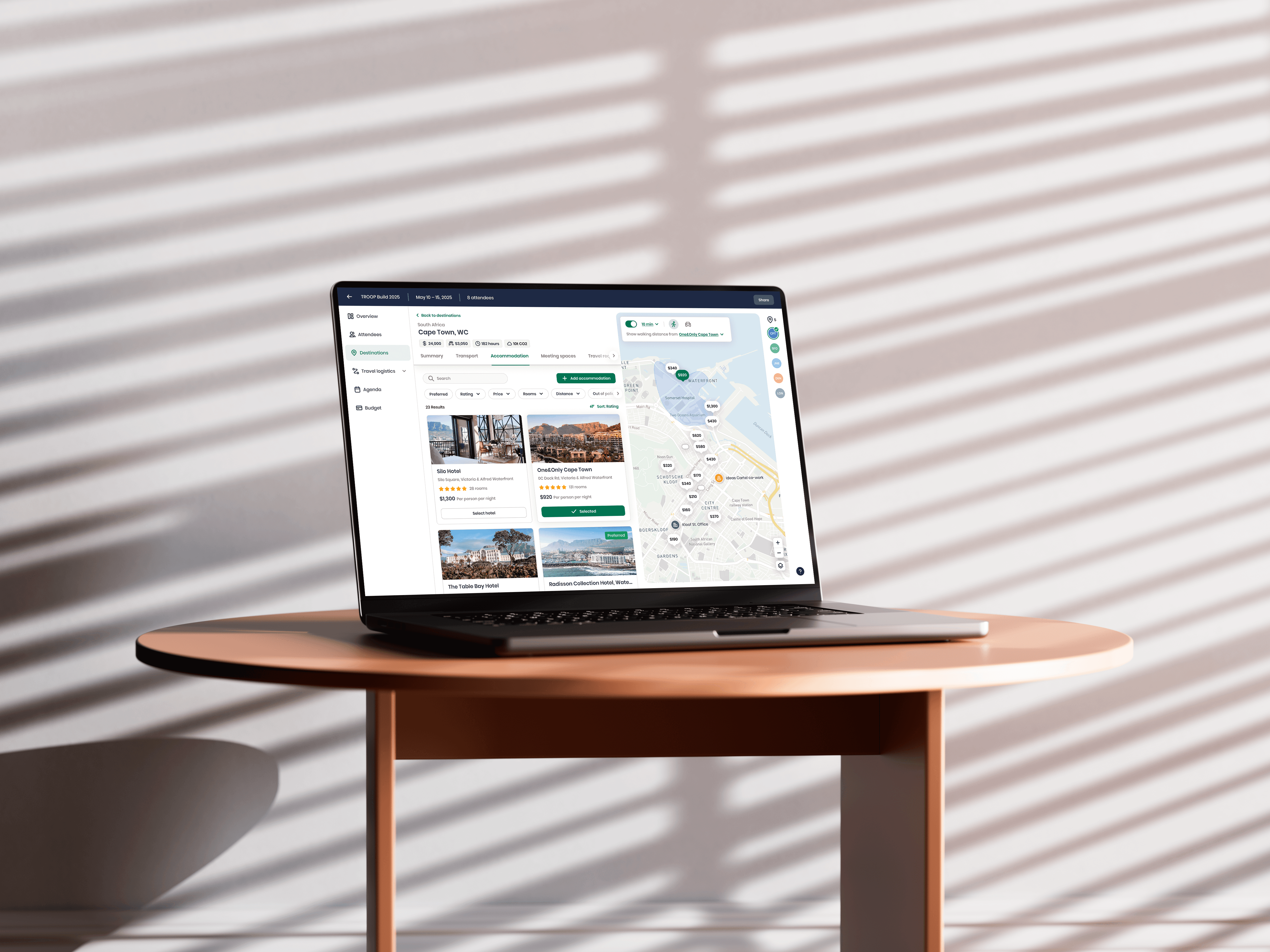
While Troop’s navigation worked, it had redundant actions, a cluttered structure and lacked necessary affordances. The goal of this project was to cut down on user errors, streamline the navigation, improve accessibility and usability and refresh the UI to match our updated UI.
Product
New navigation
Services
User interviews
UX / UI design
My role
Lead Product Design
Timeline
3 weeks
While Troop’s navigation worked, it had redundant actions, a cluttered structure and lacked necessary affordances. The goal of this project was to cut down on user errors, streamline the navigation, improve accessibility and usability and refresh the UI to match our updated UI.
Product
New navigation
Services
User interviews
UX / UI design
My role
Lead Product Design
Timeline
3 weeks
While Troop’s navigation worked, it had redundant actions, a cluttered structure and lacked necessary affordances. The goal of this project was to cut down on user errors, streamline the navigation, improve accessibility and usability and refresh the UI to match our updated UI.
Product
New navigation
Services
User interviews
UX / UI design
My role
Lead Product Design
Timeline
3 weeks
The challenge
While the navigation was usable, it was not performing as optimally as it could. Users struggled to perform simple tasks, and there were actions that removed them from the context of their meeting planning. Our hypothesis was that with a restructure of the information architecture, application of better affordances and an updated design, users would be able to more intuitively and confidently interact with the navigation. The challenge was to redesign the navigation thoughtfully, while preserving user context, and working within Engineering’s capacity and short timeline.
Problem statement
Troop’s navigation was functional but confusing, causing users to struggle with basic actions. Redundant actions and unclear hierarchy disrupted user flow, reduced confidence, and led to frequent misclicks.
The challenge
While the navigation was usable, it was not performing as optimally as it could. Users struggled to perform simple tasks, and there were actions that removed them from the context of their meeting planning. Our hypothesis was that with a restructure of the information architecture, application of better affordances and an updated design, users would be able to more intuitively and confidently interact with the navigation. The challenge was to redesign the navigation thoughtfully, while preserving user context, and working within Engineering’s capacity and short timeline.
Problem statement
Troop’s navigation was functional but confusing, causing users to struggle with basic actions. Redundant actions and unclear hierarchy disrupted user flow, reduced confidence, and led to frequent misclicks.
The challenge
While the navigation was usable, it was not performing as optimally as it could. Users struggled to perform simple tasks, and there were actions that removed them from the context of their meeting planning. Our hypothesis was that with a restructure of the information architecture, application of better affordances and an updated design, users would be able to more intuitively and confidently interact with the navigation. The challenge was to redesign the navigation thoughtfully, while preserving user context, and working within Engineering’s capacity and short timeline.
Problem statement
Troop’s navigation was functional but confusing, causing users to struggle with basic actions. Redundant actions and unclear hierarchy disrupted user flow, reduced confidence, and led to frequent misclicks.
Part 1
Knowledge gathering
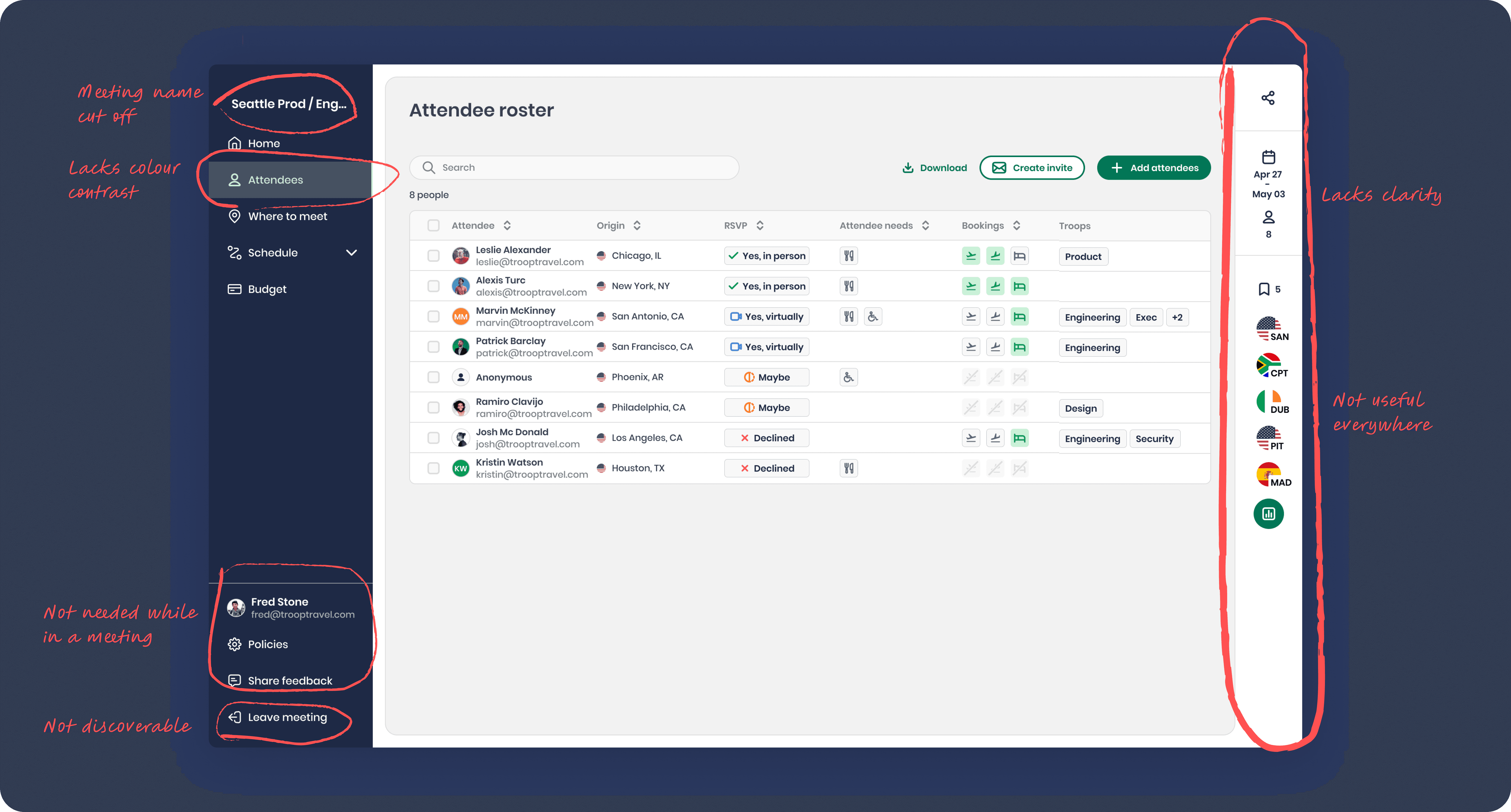
We had increasingly been receiving feedback both internally and from our users that they had been confused by some of the navigation. During usability tests, this became even clearer. Users repeatedly struggled with basic actions such as exiting a meeting. Upon realising this, our Engineering and Product teams made a quick update to place it at the top of the left navigation thinking this would solve the issue. Instead, users began clicking it expecting to return to the meeting overview, only to be taken out of the meeting entirely. Instead of more quick fixes, myself and the Design team used this as evidence that we required a real solution and this then became a project.
To start, my team and I reviewed LogRocket sessions to observe real user behaviour and click patterns. We collated this with feedback from the Customer Success team and identified the biggest problem areas in the navigation. Once we had a clear understanding of the problems, we drafted a testing script and ran internal user interviews. Thereafter, another designer and I ran a collaboration session where we generated over 20 concepts for the navigation. Based on these results and on research we conducted on other SaaS products, we worked with Product in iterative cycles and reviews, using short feedback loops to shape the new navigation approach.
Part 1
Knowledge gathering
We had increasingly been receiving feedback both internally and from our users that they had been confused by some of the navigation. During usability tests, this became even clearer. Users repeatedly struggled with basic actions such as exiting a meeting. Upon realising this, our Engineering and Product teams made a quick update to place it at the top of the left navigation thinking this would solve the issue. Instead, users began clicking it expecting to return to the meeting overview, only to be taken out of the meeting entirely. Instead of more quick fixes, myself and the Design team used this as evidence that we required a real solution and this then became a project.
To start, my team and I reviewed LogRocket sessions to observe real user behaviour and click patterns. We collated this with feedback from the Customer Success team and identified the biggest problem areas in the navigation. Once we had a clear understanding of the problems, we drafted a testing script and ran internal user interviews. Thereafter, another designer and I ran a collaboration session where we generated over 20 concepts for the navigation. Based on these results and on research we conducted on other SaaS products, we worked with Product in iterative cycles and reviews, using short feedback loops to shape the new navigation approach.
Part 1
Knowledge gathering
We had increasingly been receiving feedback both internally and from our users that they had been confused by some of the navigation. During usability tests, this became even clearer. Users repeatedly struggled with basic actions such as exiting a meeting. Upon realising this, our Engineering and Product teams made a quick update to place it at the top of the left navigation thinking this would solve the issue. Instead, users began clicking it expecting to return to the meeting overview, only to be taken out of the meeting entirely. Instead of more quick fixes, myself and the Design team used this as evidence that we required a real solution and this then became a project.
To start, my team and I reviewed LogRocket sessions to observe real user behaviour and click patterns. We collated this with feedback from the Customer Success team and identified the biggest problem areas in the navigation. Once we had a clear understanding of the problems, we drafted a testing script and ran internal user interviews. Thereafter, another designer and I ran a collaboration session where we generated over 20 concepts for the navigation. Based on these results and on research we conducted on other SaaS products, we worked with Product in iterative cycles and reviews, using short feedback loops to shape the new navigation approach.
Part 2
Redesign
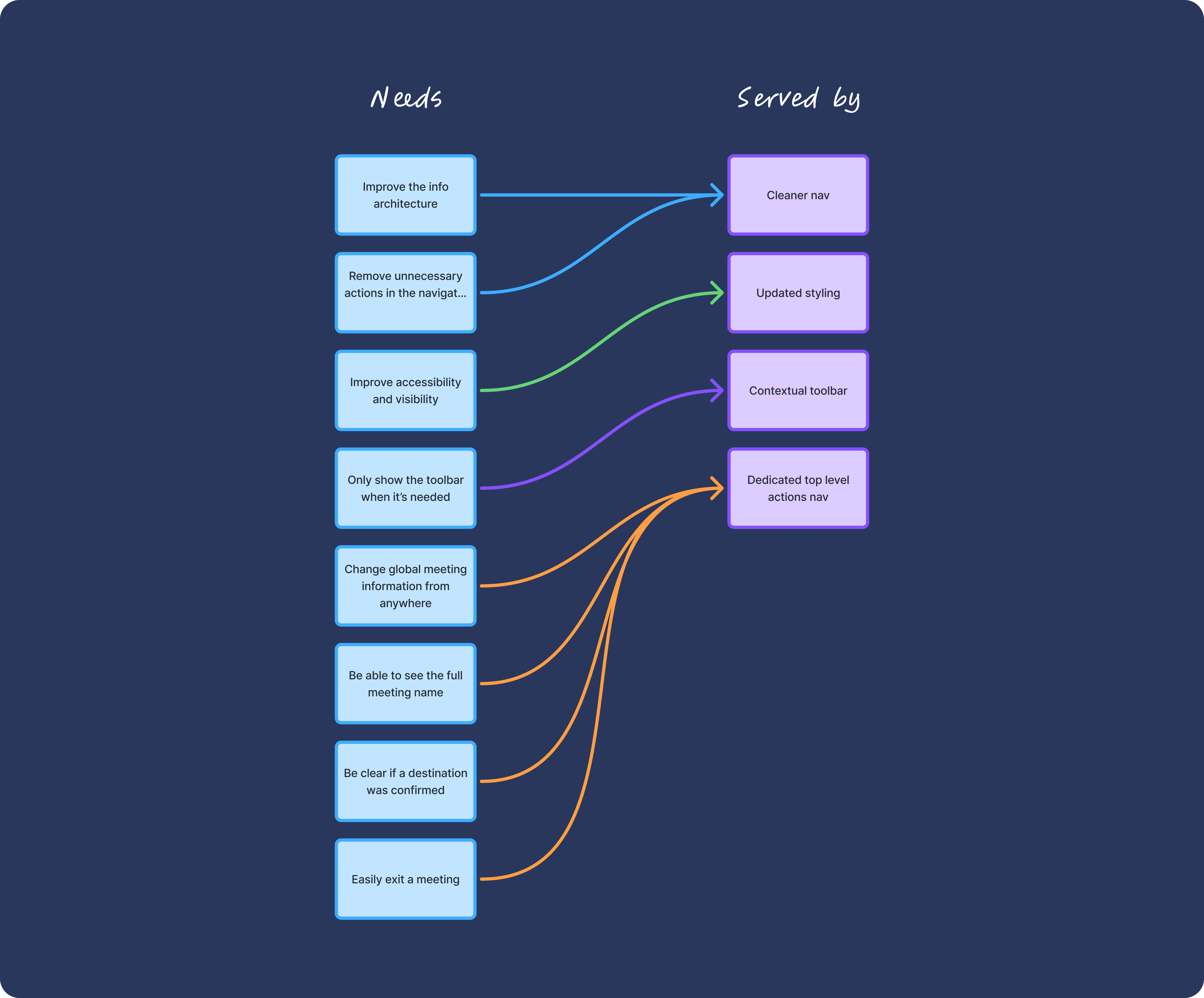
Before jumping into solutions, I clarified the key problems we needed to address: build user confidence when performing actions, improve the information architecture, clean up the navigation, and clearly separate global actions from local ones.
Key issues identified:
Users wanted the ability to update global meeting details from anywhere in the platform.
Certain navigation items unnecessarily pulled users out of the meeting context, such as meeting travel policies
The vertical navigation layout caused long meeting names to be cut off.
Users struggled to leave a meeting
Accessibility was weak — selected nav items weren’t always clear.
Users often didn’t realise they had confirmed a destination because it was only shown on the overview page.
A right-hand toolbar was visible everywhere, even though it was only relevant on one screen.
Because our timeline was tight, I moved quickly and produced early iterations within a few days. Each change directly mapped back to the problems we uncovered and aligned with our newly updated UI patterns.
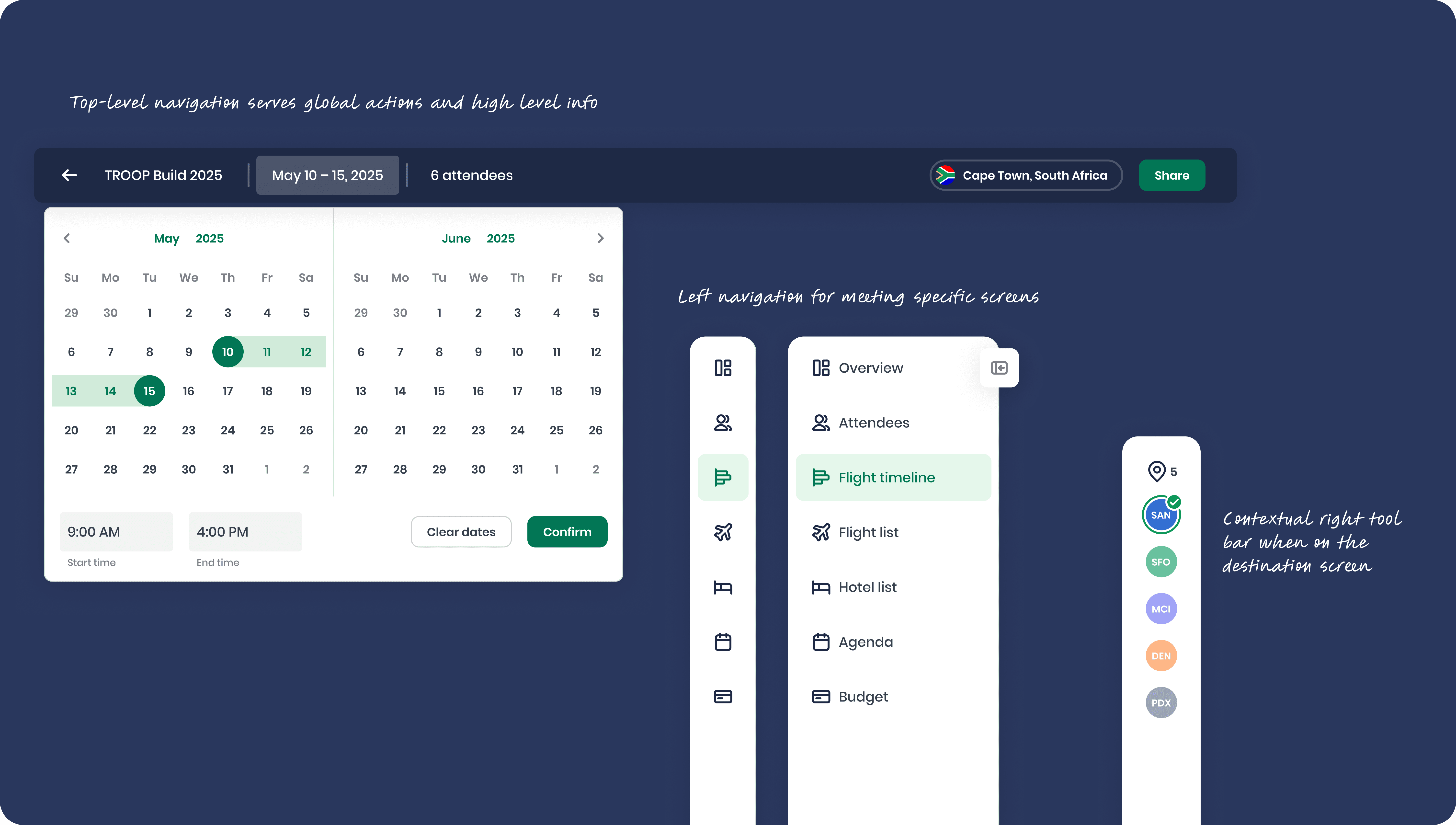
In the final design, I split the left navigation into two distinct levels. The top-level navigation included global meeting actions like the meeting name, dates, attendees, selected destination, and the option to exit the meeting. The left-hand navigation focused on detailed meeting screens such as the overview, agenda, and budget. This separation helped guide users toward what mattered most. Global actions were used less frequently, so once those were set, the left-hand nav naturally became the primary way to navigate through the meeting.
Before releasing anything into production, we validated the redesign with the Product team and ran another round of internal testing to make sure everything landed as intended.
Part 2
Redesign
Before jumping into solutions, I clarified the key problems we needed to address: build user confidence when performing actions, improve the information architecture, clean up the navigation, and clearly separate global actions from local ones.
Key issues identified:
Users wanted the ability to update global meeting details from anywhere in the platform.
Certain navigation items unnecessarily pulled users out of the meeting context, such as meeting travel policies
The vertical navigation layout caused long meeting names to be cut off.
Users struggled to leave a meeting
Accessibility was weak — selected nav items weren’t always clear.
Users often didn’t realise they had confirmed a destination because it was only shown on the overview page.
A right-hand toolbar was visible everywhere, even though it was only relevant on one screen.
Because our timeline was tight, I moved quickly and produced early iterations within a few days. Each change directly mapped back to the problems we uncovered and aligned with our newly updated UI patterns.
In the final design, I split the left navigation into two distinct levels. The top-level navigation included global meeting actions like the meeting name, dates, attendees, selected destination, and the option to exit the meeting. The left-hand navigation focused on detailed meeting screens such as the overview, agenda, and budget. This separation helped guide users toward what mattered most. Global actions were used less frequently, so once those were set, the left-hand nav naturally became the primary way to navigate through the meeting.
Before releasing anything into production, we validated the redesign with the Product team and ran another round of internal testing to make sure everything landed as intended.
Part 2
Redesign
Before jumping into solutions, I clarified the key problems we needed to address: build user confidence when performing actions, improve the information architecture, clean up the navigation, and clearly separate global actions from local ones.
Key issues identified:
Users wanted the ability to update global meeting details from anywhere in the platform.
Certain navigation items unnecessarily pulled users out of the meeting context, such as meeting travel policies
The vertical navigation layout caused long meeting names to be cut off.
Users struggled to leave a meeting
Accessibility was weak — selected nav items weren’t always clear.
Users often didn’t realise they had confirmed a destination because it was only shown on the overview page.
A right-hand toolbar was visible everywhere, even though it was only relevant on one screen.
Because our timeline was tight, I moved quickly and produced early iterations within a few days. Each change directly mapped back to the problems we uncovered and aligned with our newly updated UI patterns.
In the final design, I split the left navigation into two distinct levels. The top-level navigation included global meeting actions like the meeting name, dates, attendees, selected destination, and the option to exit the meeting. The left-hand navigation focused on detailed meeting screens such as the overview, agenda, and budget. This separation helped guide users toward what mattered most. Global actions were used less frequently, so once those were set, the left-hand nav naturally became the primary way to navigate through the meeting.
Before releasing anything into production, we validated the redesign with the Product team and ran another round of internal testing to make sure everything landed as intended.
Impact
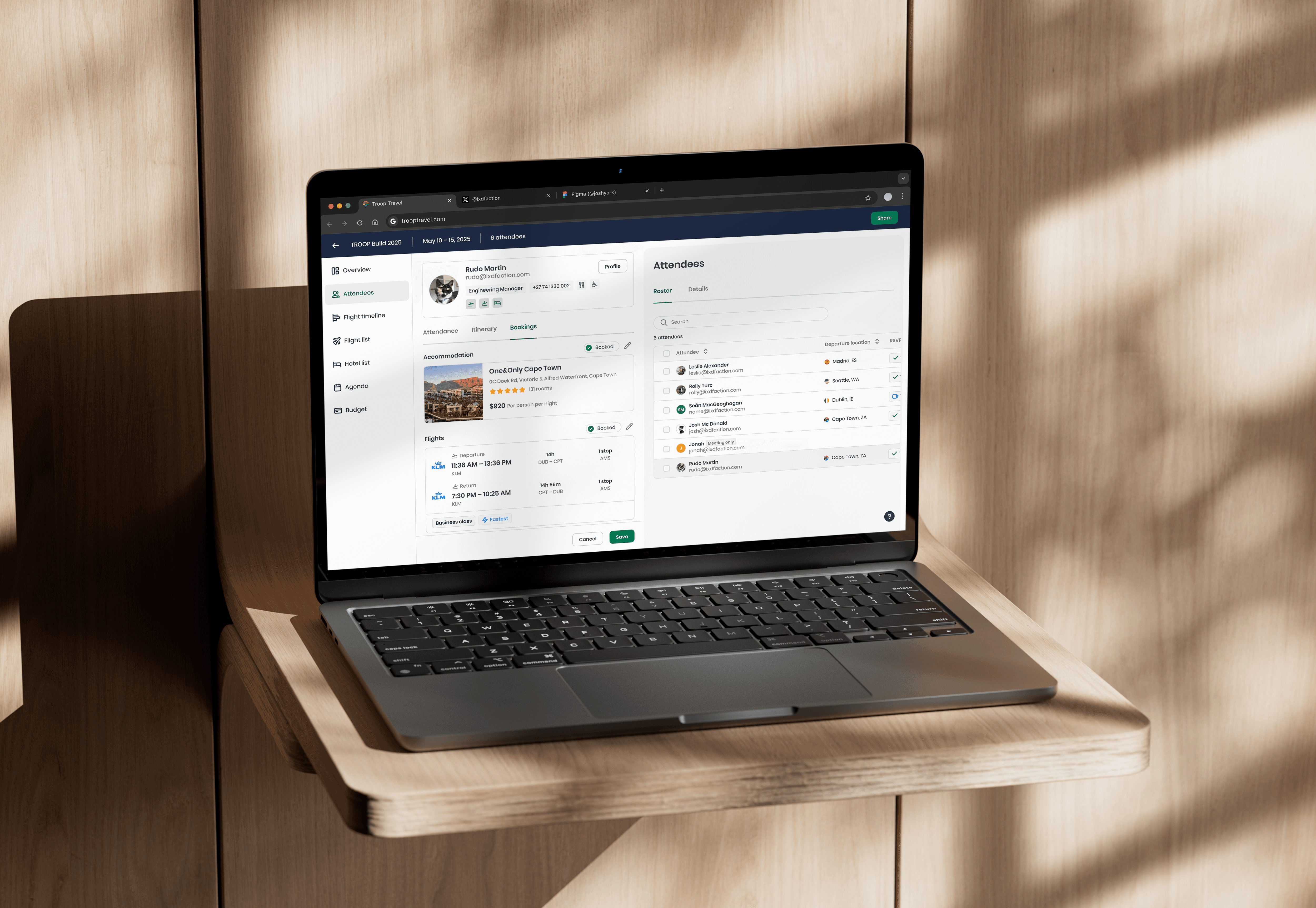
The project delivered impact on multiple levels. Internally, the new navigation became far more scalable — adding new screens did not threaten the structure or layout. I also used the opportunity to fix lingering UI inconsistencies and standardise key interaction patterns.
For users, the separation of global and local actions made navigation far more intuitive. Previously, many actions were only accessible from the overview page; now users could make important updates from anywhere in the platform. Accessibility also improved noticeably, with clearer active states and more predictable behaviour. The long-standing issue of exiting a meeting was solved by using more familiar interaction patterns, which led to fewer misclicks and navigation errors.
Impact
The project delivered impact on multiple levels. Internally, the new navigation became far more scalable — adding new screens did not threaten the structure or layout. I also used the opportunity to fix lingering UI inconsistencies and standardise key interaction patterns.
For users, the separation of global and local actions made navigation far more intuitive. Previously, many actions were only accessible from the overview page; now users could make important updates from anywhere in the platform. Accessibility also improved noticeably, with clearer active states and more predictable behaviour. The long-standing issue of exiting a meeting was solved by using more familiar interaction patterns, which led to fewer misclicks and navigation errors.
Impact
The project delivered impact on multiple levels. Internally, the new navigation became far more scalable — adding new screens did not threaten the structure or layout. I also used the opportunity to fix lingering UI inconsistencies and standardise key interaction patterns.
For users, the separation of global and local actions made navigation far more intuitive. Previously, many actions were only accessible from the overview page; now users could make important updates from anywhere in the platform. Accessibility also improved noticeably, with clearer active states and more predictable behaviour. The long-standing issue of exiting a meeting was solved by using more familiar interaction patterns, which led to fewer misclicks and navigation errors.
Reflection
This project delivered strong results in a compressed timeline. Despite the fast turnaround, I completed the design process and we had the update dev-complete within a month. There were no implications with the new navigation even though it was a large fundamental change. The goal was to solve key user pain points without disrupting the backend architecture and deliver the redesign in a way that matched the Front-end team’s capacity. Our goal was achieved, and there have been very few to no complaints since launch
Reflection
This project delivered strong results in a compressed timeline. Despite the fast turnaround, I completed the design process and we had the update dev-complete within a month. There were no implications with the new navigation even though it was a large fundamental change. The goal was to solve key user pain points without disrupting the backend architecture and deliver the redesign in a way that matched the Front-end team’s capacity. Our goal was achieved, and there have been very few to no complaints since launch
Reflection
This project delivered strong results in a compressed timeline. Despite the fast turnaround, I completed the design process and we had the update dev-complete within a month. There were no implications with the new navigation even though it was a large fundamental change. The goal was to solve key user pain points without disrupting the backend architecture and deliver the redesign in a way that matched the Front-end team’s capacity. Our goal was achieved, and there have been very few to no complaints since launch
Time in Cape Town, ZA
00:00
© 2025 Josh York Mc Donald
Time in Cape Town, ZA
00:00
© 2025 Josh York Mc Donald
Time in Cape Town, ZA
00:00
© 2025 Josh York Mc Donald